<?xml version="1.0" encoding="utf-8" ?>
<!DOCTYPE html>
<html xmlns="http://www.w3.org/1999/xhtml"><head>
  <meta http-equiv="Content-Type" content="text/html; charset=utf-8"/>
  <meta name="generator" content="Adobe RoboHelp 2022"/>
  <meta name="topic-comment" content="Item type templates NOTE not used in Audio capture"/>
  <title>Media_Properties</title>
  <link rel="stylesheet" type="text/css" href="../css/PearsonVUE2020.css"/>
</head>
<body>
  <p style="margin-top: 8pt;margin-bottom: 8pt">Choose media settings for items that contain audio or video.</p>
  <ul>
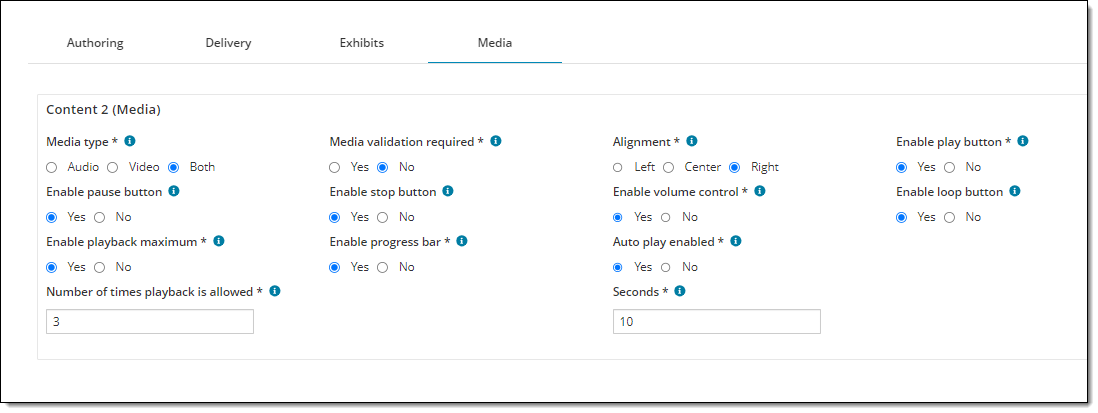
    <li style="margin-top: 8pt; margin-bottom: 8pt;">The Media tab is not visible until a Media component has been added on the Authoring properties tab. If multiple Media components are added, a separate section is shown for each component (&quot;Content 1&quot;, &quot;Content 2&quot;, etc.). You must choose settings for each Media component.</li>
    <li style="margin-top: 8pt; margin-bottom: 8pt;">Media files must be hosted in the Media Content Deployer application before they can be added to an item<b>.</b></li>
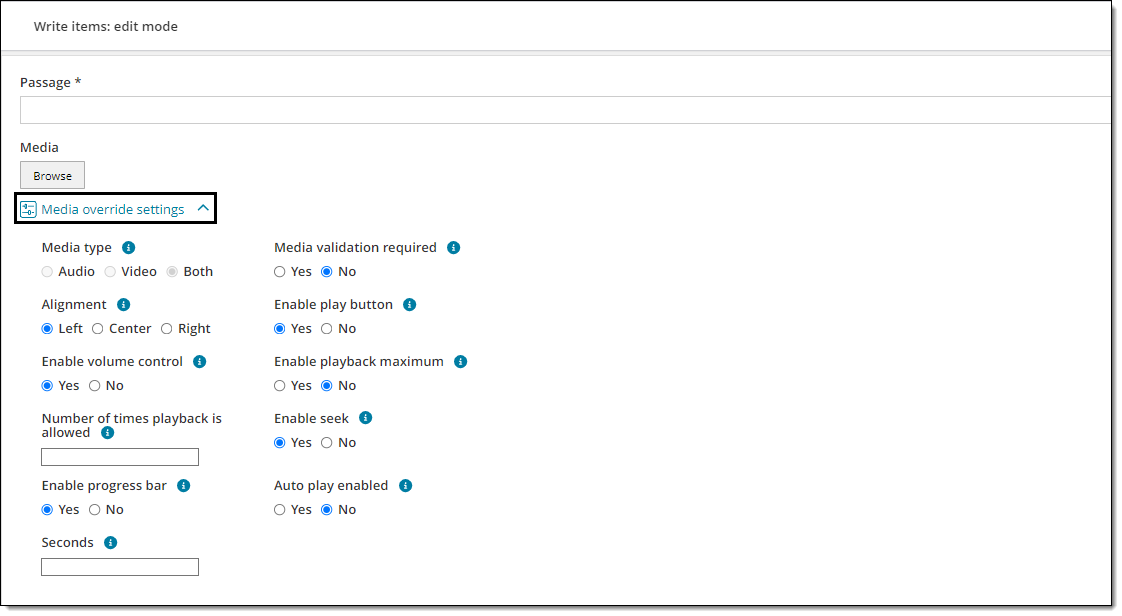
    <li style="margin-top: 8pt;margin-bottom: 12pt">Item bank managers can override media settings in the Authoring application by expanding the <a class="dropspot" data-rhwidget="DropSpot" data-target="drop-down" href="#">Media override settings menu</a>.  <div class="droptext" data-targetname="drop-down">
        <p><img alt="" src="../images/ED_MediaOverrideSettings.png"/></p>
      </div>
    </li>
  </ul>
  <p style="margin-top: 8pt;margin-bottom: 14pt"><img alt="" data-thumbnail="908 342" src="../images/ED_Mgmt_SNIPPET_Media.png" style="cursor: nesw-resize;"/></p>
  <table border="1" cellpadding="1" cellspacing="1" class="right-left-withFIRSTROW-COLOR" style="border-collapse: collapse;">
    <colgroup>
      <col/>
      <col/>
    </colgroup>
    <thead>
      <tr>
        <th style="border-left-style: none;border-top-style: none;border-right-style: none;border-bottom-style: none">
          <p class="TableHeading">Field</p>
        </th>
        <th style="border-left-style: none;border-top-style: none;border-right-style: none;border-bottom-style: none">
          <p class="TableHeading">Description</p>
        </th>
      </tr>
    </thead>
    <tbody>
      <tr>
        <td style="vertical-align: top"><span class="emphasis2">Media type</span></td>
        <td style="vertical-align: top">
          <p style="margin-top: 8pt;margin-bottom: 8pt"><span style="font-size:11pt">Determines which type of media can be added by authors (<span class="emphasis">Audio</span>, <span class="emphasis">Video</span>, or <span class="emphasis">Both</span>). </span></p>
          <p style="margin-top: 8pt;margin-bottom: 8pt"><span style="font-size:11pt"></span><span style="font-size: 11pt;"><span class="emphasis2"><strong><span style="font-size:11pt;"><img alt="Note" height="14" src="../images/ED_Icon_info_fortables.png" width="14"/> </span></strong></span></span><span style="font-size: 11pt;">When browsing for media files to add, authors will only see files that match the supported file type for the selected media (e.g., only audio file types for Audio, only video files for Video, or all media files for Both). </span></p>
        </td>
      </tr>
      <tr>
        <td><span class="emphasis2">Media validation required</span></td>
        <td>
          <p style="margin-top: 8pt;margin-bottom: 8pt"><span style="font-size:11pt">Determines whether or not authors are required to add a media file to a Media section before they can submit the item. </span></p>
          <ul>
            <li><span class="emphasis">Yes:</span> Authors are required to add a media file before submitting the item. The item can still be <strong>saved </strong>without adding a media file. <strong></strong></li>
            <li><span class="emphasis">No:</span> Authors are <strong>not </strong>required to add a media file before submitting the item. </li>
          </ul>
        </td>
      </tr>
      <tr>
        <td><span class="emphasis2">Alignment</span></td>
        <td>
          <p style="margin-top: 8pt;margin-bottom: 8pt">Determines where the media player is aligned on the screen (left, center, or right) during test delivery. </p>
        </td>
      </tr>
      <tr>
        <td><span class="emphasis2">Enable play button</span></td>
        <td>
          <p style="margin-top: 8pt;margin-bottom: 8pt">Enables (<span class="emphasis">Yes</span>) or disables (<span class="emphasis">No</span>) the play button<span class="emphasis"> </span>on the media player.</p>
        </td>
      </tr>
      <tr>
        <td><span class="emphasis2">Enable pause button</span></td>
        <td>
          <p>Enables (<span class="emphasis">Yes</span>) or disables (<span class="emphasis">No</span>) the pause button<span class="emphasis"> </span>on the media player. </p>
          <ul>
            <li>If <span class="emphasis">Yes</span>, the media file can be paused. When the play button is clicked after pausing, the media will continue playing from the point where it was stopped. </li>
            <li>If <span class="emphasis">No</span>, the media file can only be stopped and cannot be paused. Each time the media file is stopped it will return to the beginning of the clip. </li>
          </ul>
        </td>
      </tr>
      <tr>
        <td><span class="emphasis2">Enable stop button</span></td>
        <td>
          <p style="margin-top: 8pt;margin-bottom: 8pt">Enables (<span class="emphasis">Yes</span>) or disables (<span class="emphasis">No</span>) the stop button<span class="emphasis"> </span>on the audio or video player.</p>
          <p style="margin-top: 8pt;margin-bottom: 8pt">If you disable the stop button, the entire media file will be played without stopping unless a pause button is enabled. </p>
        </td>
      </tr>
      <tr>
        <td><span class="emphasis2">Enable volume control</span></td>
        <td>
          <p style="margin-top: 8pt;margin-bottom: 8pt">Enables (<span class="emphasis">Yes</span>) or disables (<span class="emphasis">No</span>) the volume control slider<span class="emphasis"> </span>on the audio or video player.</p>
          <p style="margin-top: 8pt;margin-bottom: 8pt"><img alt="" data-thumbnail="293 54" src="../images/ED_Media_Volume.png"/></p>
          <p style="margin-top: 8pt;margin-bottom: 8pt"><span class="emphasis2"><strong><span style="font-size:11pt;"><img alt="Note" height="14" src="../images/ED_Icon_info_fortables.png" width="14"/> </span></strong></span>If <span class="emphasis">No</span> is selected, volume control is hidden and the <strong>loudest </strong>volume level will be used by default. If you plan to disable volume control, make sure to test the media clip to ensure an appropriate volume level for test delivery. </p>
        </td>
      </tr>
      <tr>
        <td><span class="emphasis2">Enable loop button</span></td>
        <td>
          <p style="margin-top: 8pt;margin-bottom: 8pt"><span style="font-size:11pt">Enables (<span class="emphasis">Yes</span>) or disables (<span class="emphasis">No</span>) the loop button<span class="emphasis"> </span>on the media player. </span></p>
          <p style="margin-top: 8pt;margin-bottom: 8pt"><img alt="" data-thumbnail="293 54" src="../images/ED_Media_Loop.png"/></p>
          <p style="margin-top: 8pt;margin-bottom: 8pt"><span style="font-size:11pt;"><img alt="Note" height="14" src="../images/ED_Icon_info_fortables.png" width="14"/> The loop button will not work unless a play button is also enabled. <strong> </strong></span></p>
          <ul>
            <li style="margin-top: 8pt; margin-bottom: 8pt;">If <span class="emphasis">Yes</span>, the media will continuously replay itself once the play button is clicked, unless the pause or stop button is clicked (in which case a pause or stop button must be enabled). If a playback maximum is set, the media will loop itself until the maximum number of playbacks is reached. <strong>Note:</strong> the stop button is disabled if playback maximum is set, so only a pause button can be used to manually stop looping once it is started. </li>
            <li style="margin-top: 8pt; margin-bottom: 8pt;">If <span class="emphasis">No</span><span class="emphasis">,</span> the media cannot be looped and the play button must be clicked each time the user wishes to play the media clip. </li>
          </ul>
        </td>
      </tr>
      <tr>
        <td><span class="emphasis2">Enable playback maximum</span></td>
        <td>
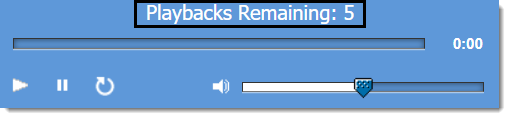
          <p style="margin-top: 8pt; margin-bottom: 6pt;"><span style="font-size:11pt">Allows you to set a limit on the number of times a media file can be played by the candidate during test delivery. </span></p>
          <p style="margin-top: 8pt; margin-bottom: 6pt;"><img alt="The media player is shown with the text &quot;Playbacks Remaining: 5&quot; at the top. " data-thumbnail="251 58" src="../images/ED_Media_PlaybackMax.png"/></p>
          <p style="margin-top: 8pt; margin-bottom: 6pt;"><span style="font-size:11pt;"><img alt="" height="14" src="../images/ED_Icon_info_fortables.png" width="14"/> If a playback maximum is set<strong>, </strong>the seek and stop functions will be disabled during test delivery. (The seek bar and stop button will not be shown on the media player.) </span><span style="font-size:11pt;"> </span></p>
          <ul>
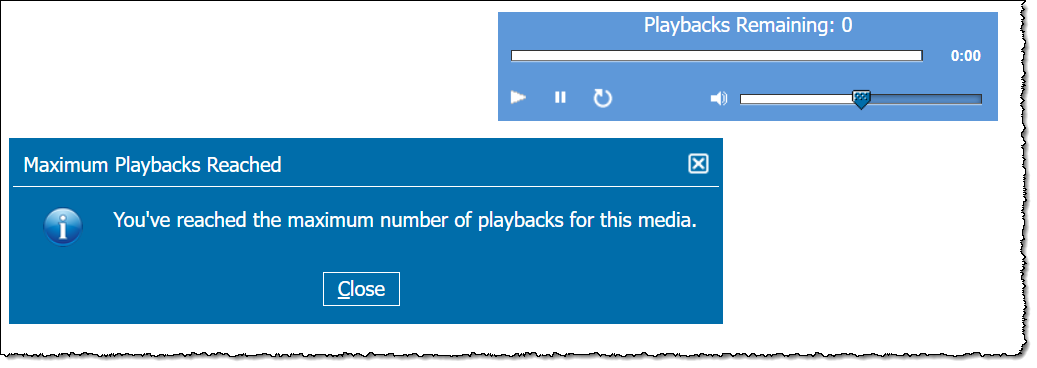
            <li style="margin-top: 8pt; margin-bottom: 8pt;"><span class="emphasis">Yes: </span>enforces a limit on the number of times the media can be played. You must also enter a number in the <span class="emphasis">Number of times playback is allowed</span>. <span style="font-size:11pt"><span style="font-size:11pt">The number of remaining playbacks is shown on the media player, and a pop-up message is displayed if the candidate reaches the maximum number of playbacks. <a class="dropspot" data-rhwidget="DropSpot" data-target="drop-down1" href="#">See example</a></span></span>
              <div class="droptext" data-targetname="drop-down1">
                <p><img alt="" src="../images/ED_Media_MaxPlaybacksReached.png" data-thumbnail="756 268"/><br/></p>
              </div>
            </li>
            <li style="margin-top: 8pt; margin-bottom: 8pt;"><span class="emphasis">No</span>: the media can be played an unlimited number of times and no playback maximum is displayed on the media player. </li>
          </ul>
        </td>
      </tr>
      <tr>
        <td><span class="emphasis2">Number of times playback is allowed </span></td>
        <td>
          <p style="margin-top: 8pt;margin-bottom: 8pt"><img alt="Note" height="14" src="../images/ED_Icon_info_fortables.png" width="14"/> <span style="text-indent:5px;"><span style="text-indent:4px;">This<span style="margin-bottom:6p;margin-left:6p;margin-right:6p;margin-top:6p;"> configuration is only shown</span></span></span><span style="margin-bottom:6p;margin-left:6p;margin-right:6p;margin-top:6p;"> if <span class="emphasis">Yes </span>is selected for </span><span class="emphasis"><span style="margin-bottom:6pt;"><span style="margin-bottom:6p;margin-left:6p;margin-right:6p;margin-top:6p;">Enable playback </span></span>maximum</span>.</p>
          <p style="margin-top: 8pt;margin-bottom: 8pt">The maximum number of times the media can be played. For example, if &quot;5&quot; is entered candidates can only play the media five times total during test delivery. <strong> </strong></p>
        </td>
      </tr>
      <tr>
        <td><span class="emphasis2">Enable progress bar</span></td>
        <td>
          <p style="margin-top: 8pt;margin-bottom: 8pt">Enables (<span class="emphasis">Yes</span>) or disables (<span class="emphasis">No</span>) the progress bar on the audio or video player.</p>
          <p style="margin-top: 8pt;margin-bottom: 8pt"><img alt="The media player is shown with the progress bar at the top." data-thumbnail="295 55" height="95" src="../images/ED_Media_ProgressBarNoSeek.png" width="509"/></p>
          <ul>
            <li style="margin-top: 8pt; margin-bottom: 8pt;">If <span class="emphasis">Yes</span>, candidates can see how much time has elapsed or is remaining. </li>
            <li style="margin-top: 8pt; margin-bottom: 8pt;">If <span class="emphasis">No</span>, candidates cannot see how much time has elapsed or is remaining.  </li>
          </ul>
        </td>
      </tr>
      <tr>
        <td><span class="emphasis2">Auto play enabled</span></td>
        <td>
          <p style="margin-top: 8pt;margin-bottom: 8pt">Enables or disables media auto play. </p>
          <ul>
            <li style="margin-top: 8pt; margin-bottom: 8pt;">If <span class="emphasis">Yes</span>, the video or audio starts playing once the item is displayed.</li>
            <li style="margin-top: 8pt; margin-bottom: 8pt;">If <span class="emphasis">No</span>, the Play button must be clicked for the media to start. </li>
          </ul>
        </td>
      </tr>
      <tr>
        <td><span class="emphasis2">Seconds</span></td>
        <td>
          <p style="margin-top: 8pt; margin-bottom: 8pt;"><img alt="Note" height="14" src="../images/ED_Icon_info_fortables.png" width="14"/> <span style="text-indent:5px;"><span style="text-indent:4px;">This<span style="margin-bottom:6p;margin-left:6p;margin-right:6p;margin-top:6p;"> configuration is only shown</span></span></span> if <span class="emphasis">Yes </span>is selected for <font color="#005a70" face="Open Sans Semibold">Auto play enabled</font>.</p>
          <p style="margin-top: 8pt; margin-bottom: 8pt;">Enter the number of seconds that should pass before the audio or video is automatically played. Countdown starts from the time the item is displayed or navigated to during test delivery. </p>
        </td>
      </tr>
      <tr>
        <td><span class="emphasis2">Enable seek</span></td>
        <td style="font-size: 12pt">
          <p style="margin-top: 8pt; margin-bottom: 8pt;"><img alt="Note" height="14" src="../images/ED_Icon_info_fortables.png" width="14"/> <span style="text-indent:5px;"><span style="text-indent:4px;">This<span style="margin-bottom:6p;margin-left:6p;margin-right:6p;margin-top:6p;"> configuration is only shown</span></span></span><span style="margin-bottom:6p;margin-left:6p;margin-right:6p;margin-top:6p;"> if <span class="emphasis">No </span>is selected for </span><span class="emphasis"><span style="margin-bottom:6pt;"><span style="margin-bottom:6p;margin-left:6p;margin-right:6p;margin-top:6p;">Enable playback </span></span>maximum</span>.</p>
          <p style="margin-top: 8pt; margin-bottom: 8pt;"><span style="font-size:12pt;"><span style="line-height:1;"><span style="font-size:11pt;line-height:1.5">Allows users to manually move forward or backward on the media timeline by dragging a slider. </span></span></span></p>

          <p style="margin-top: 8pt;margin-bottom: 8pt"><img alt="" data-thumbnail="293 54" src="../images/ED_Media_Seek.png"/></p>
          <p style="margin-top: 8pt; margin-bottom: 8pt;"><strong><img alt="Note" height="14" src="../images/ED_Icon_info_fortables.png" width="14"/></strong> In order for the seek function to work, the progress bar must also be enabled. </p>
          <ul>
            <li style="margin-top: 8pt; margin-bottom: 8pt;">If <span class="emphasis">Yes</span>, the progress bar will include a slider that users can drag back and forth along the media timeline. </li>
            <li style="margin-top: 8pt; margin-bottom: 8pt;">If <span class="emphasis">No</span>, the progress bar (if enabled) will only show the time elapsed; no slider will be available. </li>
          </ul>
        </td>
      </tr>
    </tbody>
  </table>

</body></html>